Preparing documents for an AI assistant: reliable sources, owners and updates
An AI assistant that answers questions on company documents is only as good as the sources it reads. How to choose the documents, give each one an owner and keep the answers up to date over time.
An artificial intelligence assistant that answers questions on the documents of an organisation with several sites and departments is reliable only if every document it consults has a recognisable revision in force, a site or function that owns it and a review cycle that someone enforces. Preparing therefore means bringing document control, which the quality management system already knows well, into the project. You decide which documents go in, who approves them and how each new revision replaces the previous one in the answers too. The technology comes afterwards, and it depends on these choices.
Why is an outdated revision more dangerous than a missing document?
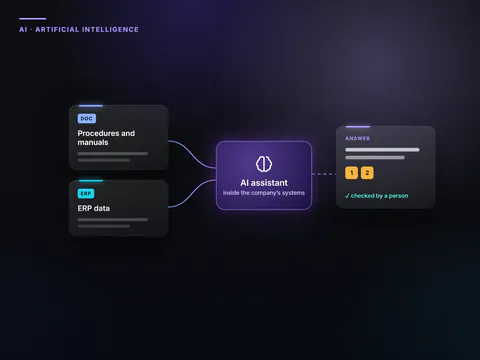
The technique most widely used to make an assistant answer from a company’s documents is called RAG (retrieval-augmented generation). For every question, the system searches the documents for the relevant passages, and the model builds its answer from them. The model does not “know” anything about the company. It reads what it finds.
In a well-structured company, the typical risk is not the missing document but the document that should not be there. A quality system procedure withdrawn last year is still indexed in a departmental folder. The supplier has updated the safety data sheet for a chemical product, but the previous version is still on one plant’s server. The assistant finds the relevant passage and reports it with a precise reference. The answer looks authoritative precisely because it is documented.
A typical scenario. A group with two plants uses the same maintenance manual for a packaging line. The first plant has introduced revision 4, with a new machine lockout sequence. The second is still working with revision 3, because the change never reached it. A technician asks the assistant how to stop the line for maintenance work and receives the revision 3 sequence. It is correct for the other plant and wrong for his. The model did its job. The error lay in the archive, which held two truths without saying which site each one belonged to.
Which documents should you include first?
The best candidates are documents that are consulted often, are in force, have a recognisable owner and carry a manageable level of confidentiality.
| Type of document | Include it straight away? | Condition |
|---|---|---|
| Procedures and work instructions in force | Yes | Owner and revision date stated |
| Machine and product manuals | Yes | Version matching what is installed or sold |
| Price lists and terms of sale | With caution | Only one valid version, with validity dates |
| Contracts and agreements | At a later stage | Role-based permissions already defined and tested |
| Email and chat | As a rule, no | Too much provisional information and too much personal data |
| Drafts, notes, historical archives | No, or in a separate area | A “historical” label visible in the answers |
A simple test helps in doubtful cases. If nobody can say who is responsible for a document, that document stays out until an owner is found.
How do you put an archive in order?
- A census. Find out where the documents are, how many there are, in which formats and who produces them. The same procedure often lives in the document management system, on the intranet and in a departmental folder, in three different versions.
- The revision in force, with the others archived. Outdated revisions leave the index or stay in a historical area with a visible label. The same goes for files with names such as “final_2” or “latest_ok”, which no quality system would accept.
- Readable scans. A PDF made from a photocopy is an image. It needs optical character recognition (OCR), and the tables must be checked, because a misread column produces wrong numbers presented as certain.
- Minimum metadata. Each document needs a title, department, owner, revision number, validity date and confidentiality level. This information lets the assistant cite the source in a useful way and lets the system apply the right permissions.
- Texts that make sense in fragments. For search, documents are split into short passages, and a passage on its own loses its context. In September 2024 Anthropic published the results of a technique that adds to each passage a short description of the document it comes from. In its tests, combined with two search methods, the technique cut failed retrievals by 49%, and by 67% with an extra step that reranks the results. The lesson applies to the people who write documents too. Use explicit headings and one topic per section, and never write “as mentioned above”.
Who is responsible for a source?
Every source needs three roles, even when one person fills them all:
- the content owner, usually the head of the area that produces the document, who approves its inclusion, sets the review date and decides when it is withdrawn
- the technical custodian, in IT, who manages the connection, the permissions and the updating of the index
- the answer quality lead, who collects users’ reports and routes them to the document owners.
In an organisation with several sites, it also helps to establish which site owns a shared document, and which documents apply to a single plant only. A “scope” field in the metadata lets the assistant answer with the right revision for the person asking, as in the maintenance manual scenario.
How do the answers stay up to date?
An assistant that is aligned on day one soon drifts out of line if nobody governs the flow of updates. There are four essential rules.
- Defined update times. When a document changes in the source system, the index picks it up within an agreed time. When it is withdrawn, it disappears from the answers too.
- Automatic expiry. Documents with a validity date drop out by themselves when they expire, or are flagged as outdated.
- Accurate personal data. The GDPR requires personal data to be accurate and, where necessary, kept up to date (Article 5), and it grants the right to erasure (Article 17). A correction or deletion must reach the index as well, not just the archive.
- A fixed set of test questions. Keep a few dozen real questions, each with the expected answer and the correct source, and rerun them every time the documents, the settings or the model change.
In May 2025 the cybersecurity agencies of the United States, the United Kingdom, Australia and New Zealand published joint guidance on data security for artificial intelligence. Among the main risks, it lists data manipulation and data drift. Drift is the gradual divergence between the data a system was tuned on and the data it receives later. In a document assistant, drift has a very specific face. The sources change while the answers lag behind.
What should the assistant do when it cannot find the answer?
It should say so. A well-configured assistant replies that it has not found a source and points to the office to contact, rather than building a plausible answer. Unanswered questions, logged and read regularly, are a valuable indicator. Together they make up the list of documents that are missing or that nobody can find.
The same applies to reports of wrong answers. Each one goes to the owner of the source involved, who corrects the document. Correcting the single answer is pointless, because the error would come back with the next question.
And what about documents that come from outside?
Supplier quotes, technical data sheets and saved web pages are useful, but they are not under the company’s control. They can contain hidden text, such as white characters on a white background, which the assistant reads and a person does not. OWASP, the international community that publishes guidance on application security, lists this risk among the weaknesses of systems that retrieve documents. It recommends accepting only verified sources and protecting the index with permissions consistent with those of the documents.
That is why external documents go into a separate area, with stricter rules. Permissions and logs follow the criteria described in our in-depth piece on how to connect an AI assistant to company systems.
In brief
- In an organisation with several sites, the typical risk is the document that should not be there. Outdated revisions and local variants produce wrong answers with credible references.
- Start with documents that are in force, consulted often and have a recognisable owner.
- Every document carries its owner, revision, validity and confidentiality level.
- Updates, withdrawals and deletions must reach the index within defined times.
- Unanswered questions show which documents are missing. Reported errors are corrected in the document.
Frequently asked questions
Do all the documents have to be rewritten before you start?
No. You start with a limited set of documents in force and fix them where needed, with a single version, clear headings and metadata. Rewriting is needed only for the texts that the tests show to be hard to understand.
How often should a document be reviewed?
It depends on its nature. A safety procedure runs on a different timetable from a product manual. What matters is that the revision date is written in the document and that someone receives an alert when it falls due.
Is it worth including emails?
Rarely. Emails contain a great deal of provisional information and a lot of personal data. It is more useful to turn important decisions into approved documents and include those.
Is the model trained on the company’s documents?
Not with the RAG technique. The documents are consulted at each question, not built into the model. You still need to check in the contract that the provider does not use questions, answers and documents to train its own models.
Choosing the sources, assigning owners and setting up updates is the first phase of our Company Brain for organisations, the company’s own searchable memory. Every answer carries a reference to the revision in force, with the permissions set for each role.
Sources
Consulted on 16 September 2026.
- Anthropic, Introducing Contextual Retrieval, 19 September 2024
- OWASP GenAI Security Project, LLM08:2025 Vector and Embedding Weaknesses
- CISA, NSA, FBI and partner agencies, AI Data Security: Best Practices for Securing Data Used to Train and Operate AI Systems, 22 May 2025
- Regulation (EU) 2016/679 (GDPR), Articles 5 and 17, EUR-Lex
 Find out moreArtificial intelligence for businessesArtificial intelligence built into the systems your company already uses. We choose the right processes, connect the data, and settle security and rules first.